
Shuffle Code Claimer guide: setup, features and troubleshooting
Set up Script Claimer or the Virtual Claimer step by step, check that each step worked, and fix anything that does not.
18+ only. Gambling can become an addiction, and this tool does not make it profitable. Read our note on gambling before you start.
Start here
Pick what you are setting up. Both need a plan, bought in the bot or in your panel; it activates by itself once the crypto payment confirms.
- Script ClaimerRuns in your browser on shuffle.com, with every tool in its panel. Your computer stays on while it claims.Desktop Chrome, Edge, Brave or Firefox, with Tampermonkey or Shuffle Helper
- Virtual ClaimerClaims on our servers around the clock. Nothing to install, and your computer can be off.A Shuffle account and a slot; nothing to install
- BothThe script for its tools, the Virtual Claimer for when your computer is off. Set up the script first: it connects the Virtual Claimer in one click.
Not sure? Compare the two.
Script Claimer, step by step
Six steps. Tick each one off as you go; your ticks stay in this browser.
Rather not install Tampermonkey? On Chrome, Edge or Brave, Shuffle Helper, our own extension, replaces steps 2 to 4.
The pictures are from English versions of each browser. In another language the buttons have other names, in the same place.
-
Get a plan for your Shuffle username
Open @ShuffleSubscriptionBot on Telegram, or your panel, and choose Script Claimer. Add your Shuffle username exactly as it appears on shuffle.com, pick a plan and pay in crypto. The plan activates by itself once the payment confirms.
You can install the script first: until a plan is active, its bar shows a Subscribe button.
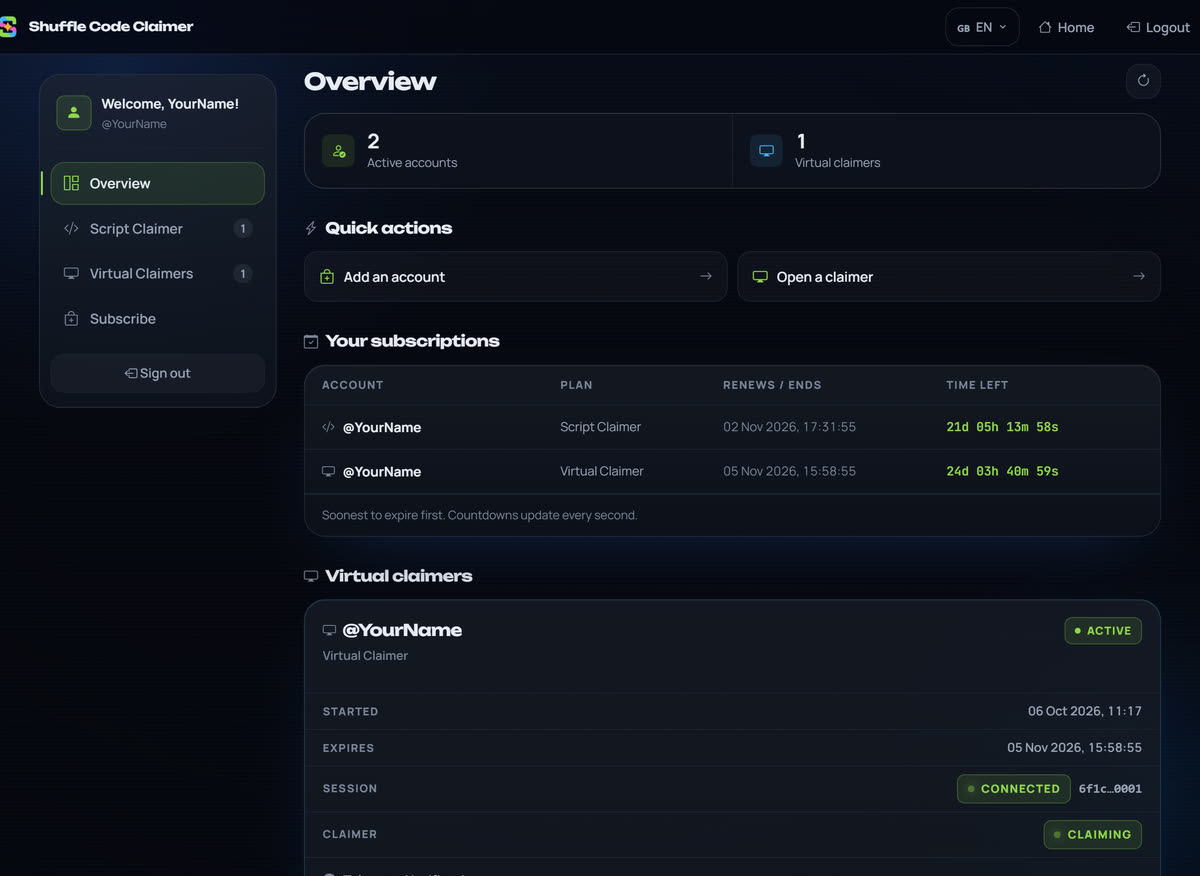
It worked if your panel's Overview lists the username with its end date.
Stuck?
“This Shuffle username is already registered”: that username already has a plan with us. If it is yours, extend it from your panel's Overview; if it is not, message @Goofy021. Typed it wrong? Use Change Username on that account in your panel.
-
Install Tampermonkey
A free extension that runs userscripts. Install it and confirm — that is the whole step.
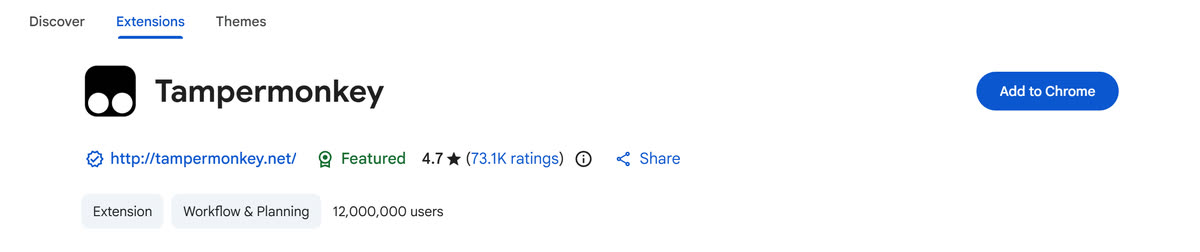
Press Add to Chrome, then Add extension. 
Press Get, then Add extension. 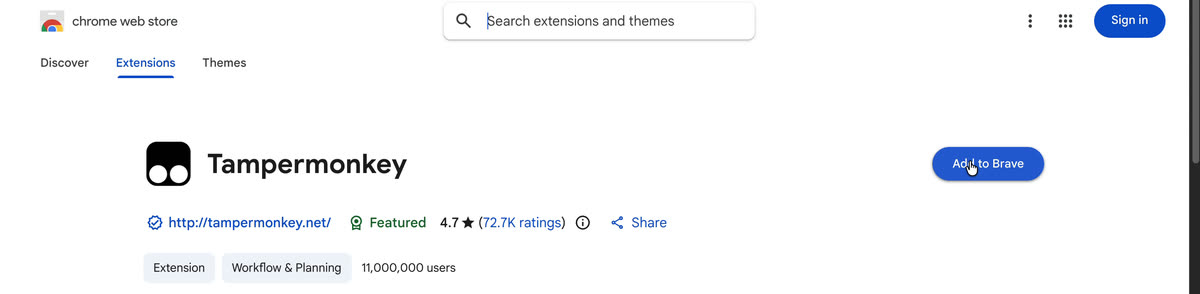
Press Add to Brave, then Add extension. Brave uses the Chrome Web Store. 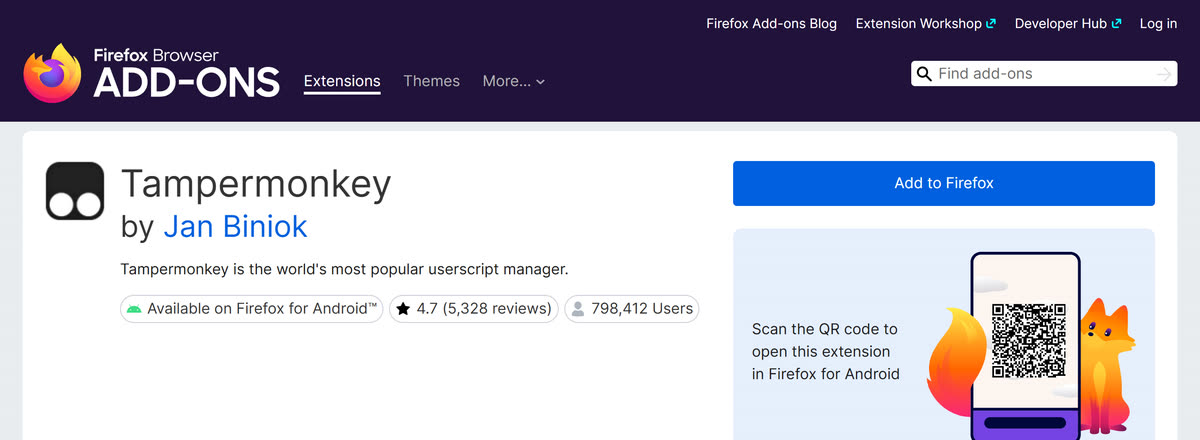
Press Add to Firefox, then Add. It worked if the Tampermonkey icon, a dark square with two white circles, is in your toolbar. If you cannot see it, it is under the puzzle-piece icon: pin it there.
Stuck?
The store says you cannot add items in Incognito or Guest mode: open a normal window of your browser and try again.
-
Let Tampermonkey run scripts
Chrome, Edge and Brave only run userscripts once you allow it. Type this address into the address bar and press Enter; it cannot be opened from a link:
chrome://extensionsedge://extensionsbrave://extensionsSwitch on Developer mode, top right of the page.

Chrome. Load unpacked, Pack extension and Update appear once it is on. Switch on Developer mode, at the bottom of the menu on the left.
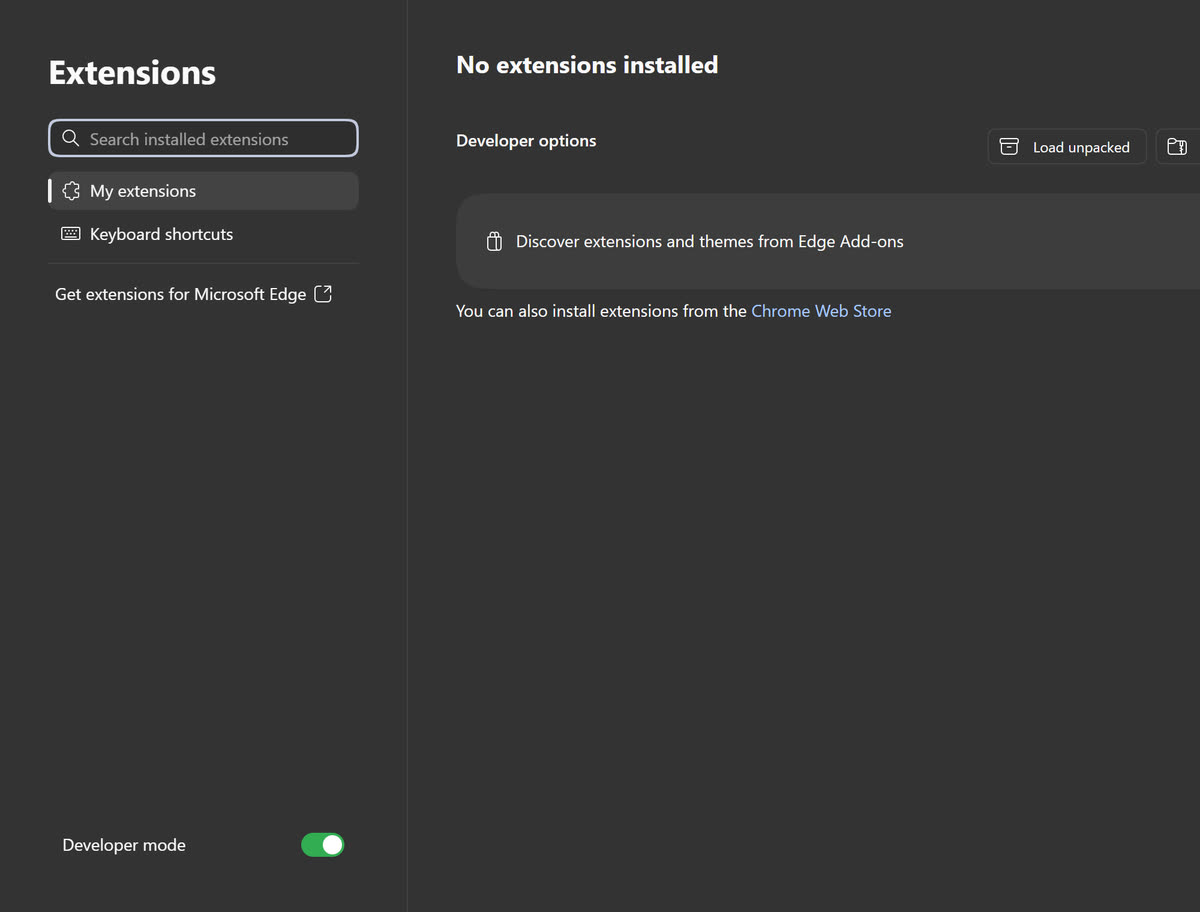
Edge. Developer options appear once it is on. Switch on Developer mode, top right of the page.
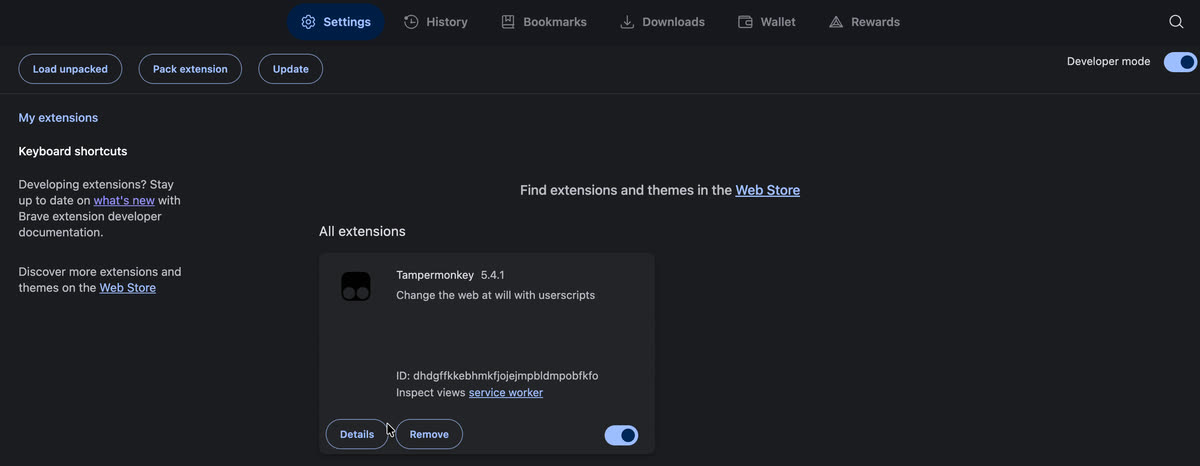
Brave, with Tampermonkey installed. Then press Details under Tampermonkey. If the page has Allow User Scripts (Chrome 138 and newer, Brave, newer Edge), switch it on.
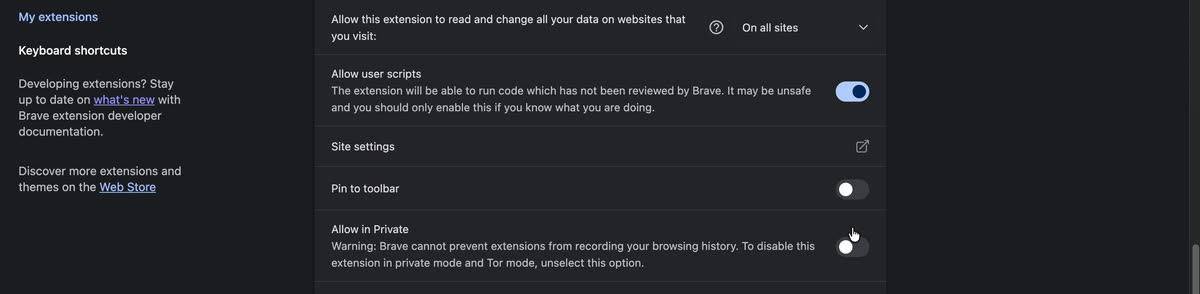
Recorded in Brave; Chrome's Details page has the same switch. It worked if Developer mode is on and, where your browser has it, so is Allow User Scripts.
Stuck?
No Allow User Scripts on the Details page? An older browser needs Developer mode only. Skipping this step is the usual reason the panel never appears on shuffle.com.
Firefox needs nothing here. Go on to step 4.
-
Install the script
Press the button. Tampermonkey opens a page called Userscript installation: check it says Shuffle Code Claimer, then press Install.
https://raw.githubusercontent.com/ShuffleCodeClaimer/ShuffleCodeClaimer/refs/heads/main/Script.user.jsIt worked if Tampermonkey's Dashboard lists Shuffle Code Claimer, switched on.
Stuck?
A page of code opens instead of Tampermonkey's page: Tampermonkey is not installed or is switched off in this browser. Go back to step 2.
-
Open Shuffle and log in
Go to shuffle.com, log in, then refresh once. The script's bar appears along the bottom of the page and connects by itself. Leave the tab open: it is now claiming for you.

The bar with a code typed in: its value, $40.00, shows before you claim. Demo account. It worked if the bar shows your Shuffle username, and in the panel's Status tab, Connection status reads “Connected”.
Stuck?
No bar, or it says “No subscription”? The fixes are in Troubleshooting.
-
Choose your claim coin and alerts
Open the panel's Claim settings tab. Pick the coin codes are claimed in, switch on Auto Vault if you want claims vaulted, and turn on the Telegram alerts you want. Rewards can be set to claim themselves in the same tab.
Telegram alerts reach you once you have pressed Start (or sent /start) in @ShuffleSubscriptionBot.
It worked if the bar shows the coin you picked.


Shuffle Helper: the script without Tampermonkey
Shuffle Helper is Script Claimer packaged as its own browser extension, for Chrome, Edge and Brave on a computer. There is no Tampermonkey to install and no Allow User Scripts switch, but it does not update itself: each new version is a new download. You still need a plan, so do step 1 above first.
Shuffle Helper does not run in Firefox. Use Tampermonkey instead: steps 2 to 4 above.
-
Download Shuffle Helper and unzip it
Press the button to download the zip. On Windows, right-click the file, choose Extract All, then Extract; on a Mac, double-click it. Move the unzipped folder somewhere it can stay, such as Documents: your browser runs Shuffle Helper from that folder.
It worked if you have a folder whose name starts with shuffle-helper, with a file called manifest.json directly inside it.
-
Load it into your browser
Type this address into the address bar and press Enter; it cannot be opened from a link:
chrome://extensionsSwitch on Developer mode, top right of the page.
edge://extensionsSwitch on Developer mode, at the bottom of the menu on the left.
brave://extensionsSwitch on Developer mode, top right of the page.
Then press Load unpacked and choose the unzipped folder, the one with manifest.json directly inside.
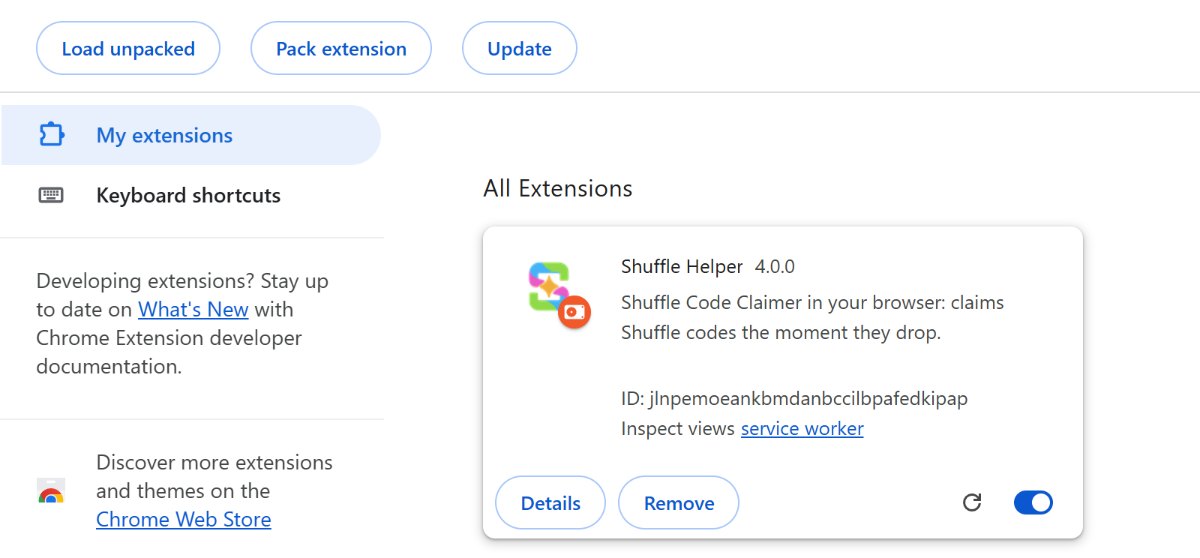
Chrome, with Shuffle Helper loaded.
Edge. Load unpacked is under Developer options once Developer mode is on.
Brave. Load unpacked appears top left once Developer mode is on. It worked if Shuffle Helper is listed on the extensions page, switched on.
Stuck?
No Load unpacked button? Switch on Developer mode first. “Manifest file is missing or unreadable”: you chose the zip, or the folder around the right one. Choose the folder with manifest.json directly inside.
-
Open Shuffle and log in
Go to shuffle.com, log in, then refresh once. The panel appears along the bottom of the page, the same as with Tampermonkey, and connects by itself. Then choose your claim coin and alerts, as in step 6 above.
It worked if the bar shows your Shuffle username, and in the panel's Status tab, Connection status reads “Connected”.
Stuck?
No bar, or it says “No subscription”? The fixes are in Troubleshooting.

Moving from Tampermonkey? Switch Shuffle Code Claimer off in Tampermonkey's Dashboard first. If both run, Shuffle Helper pauses and tells you. Your plan and claim coin come back by themselves; panel choices such as its theme and position start fresh.
To update: when the panel shows Install update, press it. A page opens with the steps: download the new zip, unzip it, press Load unpacked and choose the new folder, then delete the old folder. Your settings stay.
Virtual Claimer, step by step
You do this once. After that it runs on its own and you never need to open it again.
-
Get a slot
Buy a Virtual Claimer slot in the bot or in your panel. A slot is not tied to a username: you buy it, then connect whichever Shuffle account you want it to claim for. One slot covers one account.
It worked if the slot is listed on your panel's Virtual Claimers page.
-
Connect your Shuffle account
Pick one of three ways. Each takes a minute; email login keeps you signed in on shuffle.com.
Way 1: one click from the script
If you use the script, open its Virtual Claimer tab on shuffle.com while signed in to the account you want, and press Connect this account. That is the whole step.
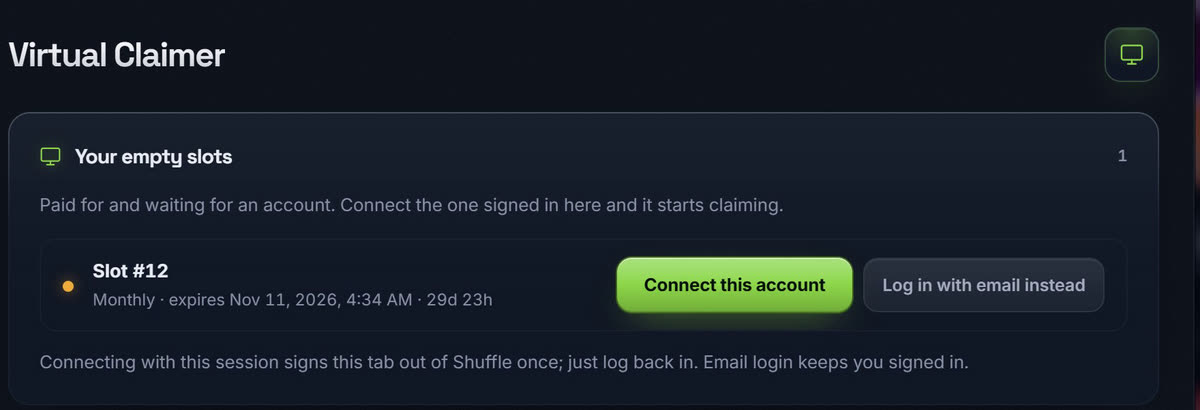
Demo account. Connecting this way hands the claimer the session your browser holds, so shuffle.com signs this tab out once. That is normal: log back in and carry on. Way 2 avoids it.
Way 2: your email and a code, on the website
Log in to your panel with Telegram, open Virtual Claimers, choose Email login on the slot and enter your Shuffle email and password. Shuffle emails you a 6-digit code; type it in and the slot connects. We keep only the session, encrypted, never your password.
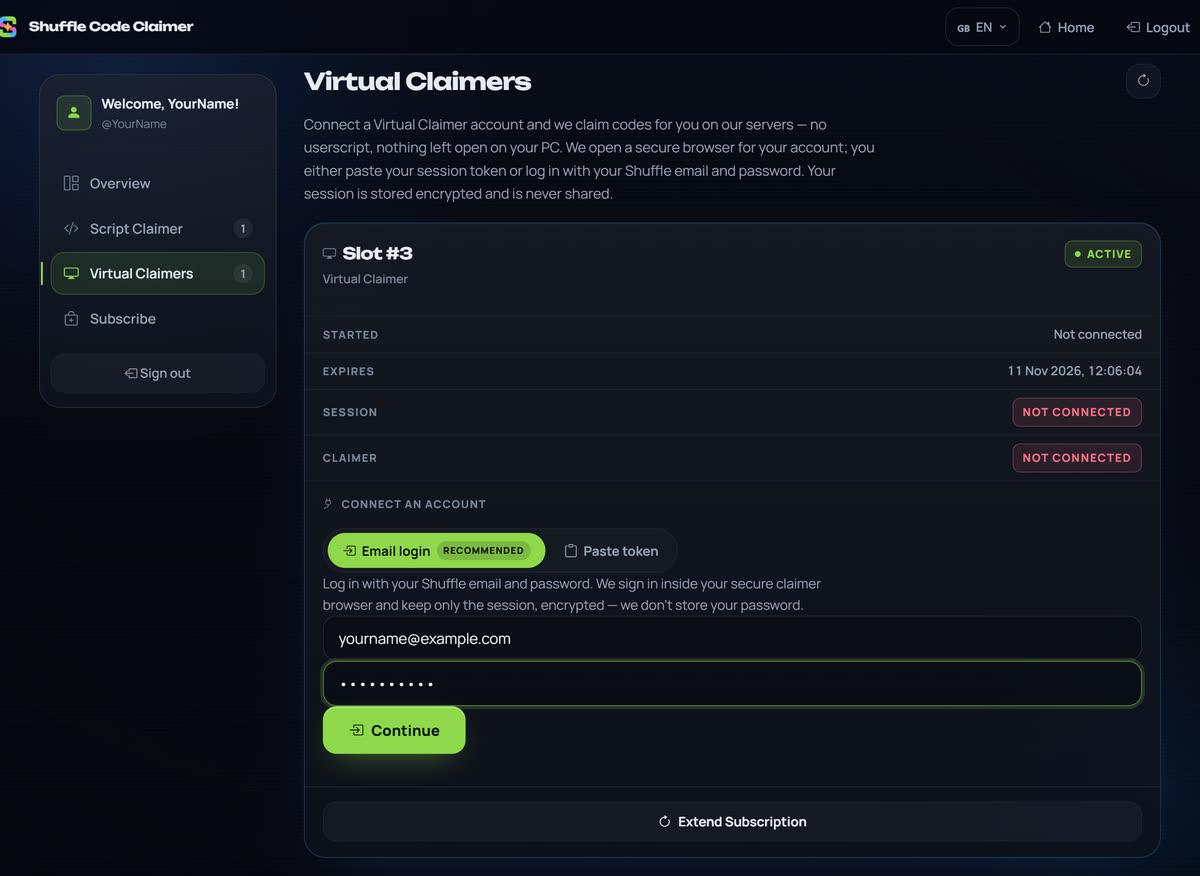
Demo account. This way creates a brand-new session of its own, so nothing of yours is spent and you stay signed in on shuffle.com. It is the easiest way if you use Shuffle on this computer.
Way 3: paste a session token
On a computer, open shuffle.com in another tab and make sure you are logged in. Open the browser's Console: Ctrl+Shift+J on Windows, Cmd+Option+J on a Mac (in Firefox, Ctrl+Shift+K or Cmd+Option+K). Paste the snippet below and press Enter: your token is copied. Paste it into the slot in your panel and press Connect.
This snippet only reads the session your browser already holds and copies it to your clipboard. It sends nothing anywhere — you can read every line of it before running it.
Shuffle gives each session a one-time token, so once we use yours, shuffle.com signs this browser out. That is normal: log back in and carry on. Your claimer is unaffected; it holds its own session now, and logging in again does not disturb it. If you would rather not be signed out at all, use Way 2.
Show the snippet
(() => {
  const root = localStorage.getItem('persist:root');
  if (!root) return console.log('%c Not signed in. Open shuffle.com, log in, then run this again. ', 'background:#fb7185;color:#111;font-weight:700;padding:2px');

  const pick = (slice) => {
    if (!slice) return null;
    let o = slice;
    if (typeof o === 'string') { try { o = JSON.parse(o); } catch (e) { return null; } }
    return o.refreshToken || (o.tokens && o.tokens.refreshToken) || null;
  };

  let token = null;
  try {
    const parsed = JSON.parse(root);
    token = pick(parsed.auth);
    if (!token) for (const k of Object.keys(parsed)) { token = pick(parsed[k]); if (token) break; }
  } catch (e) { /* fall through */ }

  if (!token) return console.log('%c No session token found. Log out of shuffle.com, log back in, then run this again. ', 'background:#fb7185;color:#111;font-weight:700;padding:2px');

  try { copy(token); console.log('%c Copied. Paste it into the Virtual Claimer panel. ', 'background:#8fd94a;color:#05140a;font-weight:700;padding:2px'); }
  catch (e) { console.log('%c Could not copy automatically. Select the line below and copy it. ', 'background:#f0ad3c;color:#140d02;font-weight:700;padding:2px'); }
  console.log('%c One-time token: shuffle.com will sign THIS browser out once the claimer uses it. Just log back in. ', 'background:#f0ad3c;color:#140d02;font-weight:700;padding:2px');
  console.log(token);
})();
The first time you paste into the Console, Chrome asks you to type
allow pastingand press Enter. Do that once, then paste the snippet.It worked if the slot shows Connected and Claiming.
Stuck?
Each error the panel can show, and what to do about it, is in Troubleshooting.
-
Choose its claim coin and messages
On your panel's Virtual Claimers page, pick the slot's claim coin, Auto Vault, its Telegram messages and which rewards it claims for you.
It worked if each change shows Saved.
-
That is it — nothing to leave open
The slot shows Connected and Claiming, and we claim on our own machines from then on. Nothing to install, nothing to keep running, and your computer can be off. You will get a Telegram message each time a code is claimed.
From the release video. Demo account. It worked if a message from @ShuffleSubscriptionBot arrives on Telegram each time it claims.
To stop, or to switch accounts: press Disconnect on the slot, in your panel or in the script's Virtual Claimer tab. The claimer stops and no longer holds your session; the slot stays yours to connect any account.
You're ready
Tick what applies to you. When every line you need is ticked, codes are claimed without you.
The script panel, tab by tab
The panel docks to the top or bottom of shuffle.com and groups its tabs. Here is what each one does; How it works shows them on a demo account.
| Tab | What it does |
|---|---|
| Status | Your account, what you have claimed today, this week and in total, and the connection to our server. |
| Rewards | Rakeback, weekly and monthly bonuses, reloads, the SHFL airdrop and tournament prizes, with what is waiting in total. Claim them in one tap, or switch on auto-claim in Claim settings. |
| Wager stats | What you have wagered, your weekly race place and what it pays, the wager that passes the next place, and the last 7 days by game category. |
| PnL | Deposits, withdrawals and balance for any period, with every bonus Shuffle paid you counted. |
| Claim logs | Every code and bonus claimed or rejected, with its value, limit, wager, time and reason. |
| Claim settings | Your claim coin, auto-vault, Telegram alerts, reward auto-claim, and the panel's theme and position. |
| Notifications | Everything worth knowing in one feed: claims, tips, rains, sign-ins and new challenges. |
| Chat Listener | Shuffle's chat filtered for you: mentions, tips, rains, moderators, VIPs, users you watch and your keywords. |
| Virtual Claimer | Connect this Shuffle account to a Virtual Claimer slot in one click, see its claim history, or buy a slot. |
| Game Tools | Blackjack helper, Mines payouts, Dice precision, RTP badges and browser, game search and VIP progress, each switched on or off. |
| Challenges | Live challenges ranked by what you can realistically hit, with prizes, multipliers and minimum bets. |
| RTP | A searchable list of games by return to player. |
Your panel, tab by tab
Everything after purchase happens in one place. Log in with Telegram at shufflecodeclaimer.com/user — it works the same in a browser or inside the Telegram mini app.
- Overview — every subscription with its end date and an exact countdown, plus your active accounts.
- Script Claimer: the accounts on a script plan, one card each, with its claim coin, auto-refresh, Telegram alerts and Change Username.
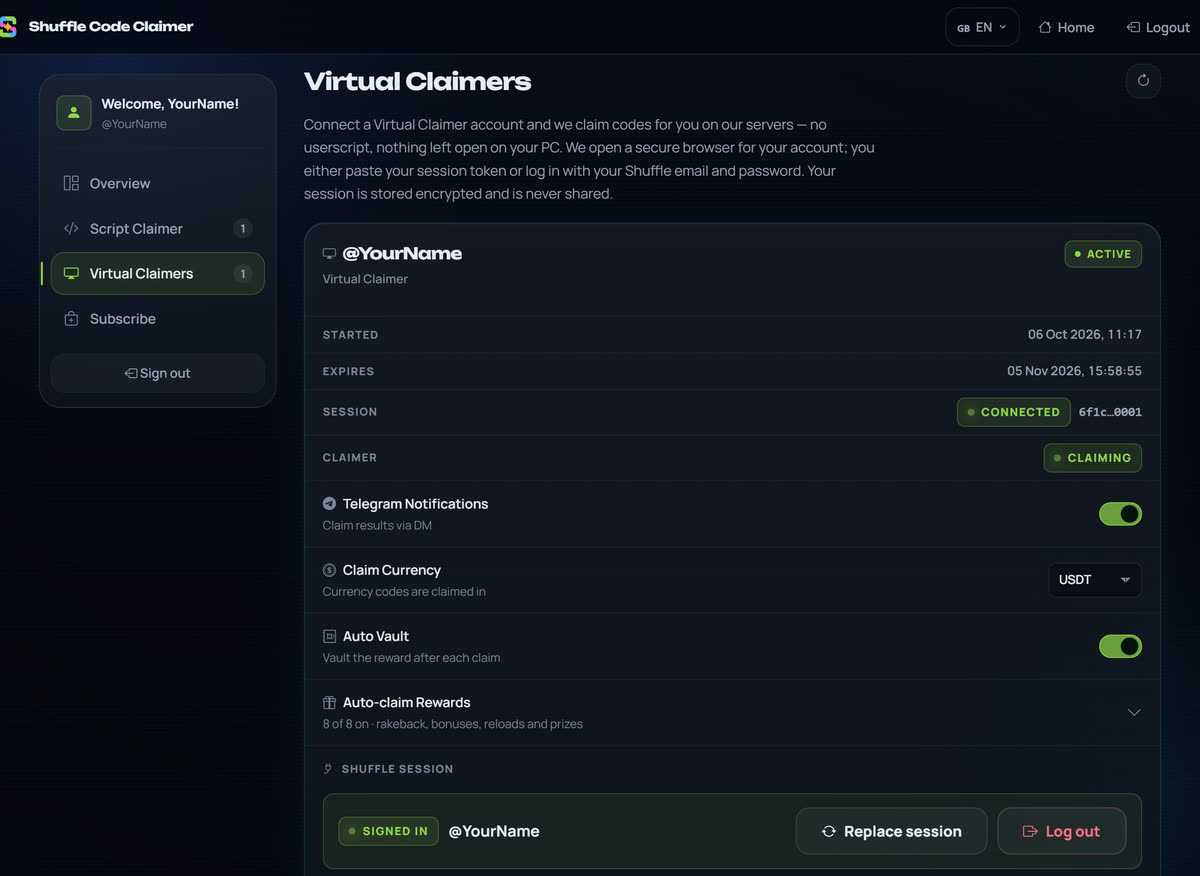
- Virtual Claimers: connect or disconnect a Shuffle account, choose its claim coin, auto-vault, Telegram messages and which rewards it auto-claims, and see its claims and stats.
- Subscribe — pick type and plan, add usernames to the cart, and pay for them all at once.
Troubleshooting
Find the message you see. Quoted messages are word for word what the script, the panel or the bot shows.
Script Claimer
| What you see | Why | What to do |
|---|---|---|
| What you seeNo panel or bar on shuffle.com | WhyTampermonkey is not allowed to run scripts yet, or the script is switched off. | What to doDo step 3 again and check both switches. On shuffle.com the Tampermonkey icon should show a 1. Then hard refresh: Ctrl+Shift+R, or Cmd+Shift+R on a Mac. |
| What you seeNo panel on shuffle.com, with Shuffle Helper | WhyShuffle Helper is switched off, or its folder was moved or deleted. | What to doOpen the extensions page and check Shuffle Helper is listed and switched on. If it is missing or shows an error, do Shuffle Helper step 2 again. Then hard refresh: Ctrl+Shift+R, or Cmd+Shift+R on a Mac. |
| What you seeA “Shuffle Helper is paused” notice: “Shuffle Code Claimer is also running in Tampermonkey.” | WhyThe script is on in Tampermonkey as well, so Shuffle Helper stepped aside. | What to doSwitch Shuffle Code Claimer off in Tampermonkey's Dashboard, or remove it, then refresh the page. |
| What you see“No subscription” or “Subscription expired” | WhyNo plan covers this Shuffle username, or the plan has ended. | What to doThe plan's username has to match your Shuffle username exactly. Check it in your panel's Overview, fix it with Change Username, or renew in the bot. |
| What you see“Log in to Shuffle first” | WhyThis browser is signed out of shuffle.com. | What to doLog in on shuffle.com in this tab, then refresh. |
| What you see“Connection interrupted; reconnecting” or “Browser is offline” | WhyYour internet dropped, or the computer went to sleep. | What to doIt reconnects by itself when you are back online. Stop the computer sleeping while you want it to claim. |
| What you see“Active on another device” | WhyThe script is also open for this account in another browser or on another computer, and that one is connected. | What to doClose the other one, then refresh this tab. |
| What you seeA code shows “Code limit reached”, “Code expired” or “Already claimed” | WhyThe code ran out before it reached you, or this account had already claimed it. | What to doNothing to fix: limited codes run out. Every result is listed in Claim logs. |
| What you see“Not enough wager” or “VIP level too low” | WhyShuffle set a condition on that code that the account does not meet. | What to doNothing the claimer can change; the next code may have no condition. |
| What you see“Install update” in the panel | WhyA newer version of the script is out. | What to doPress it, and confirm on the page Tampermonkey opens. With Shuffle Helper, follow the steps on the page that opens. |
Virtual Claimer
| What you see | Why | What to do |
|---|---|---|
| What you seeShuffle signed you out after you connected | WhyOne-click connect and a pasted token hand the claimer the session your browser held, so Shuffle ends it in the browser. | What to doLog back in; the claimer keeps its own session. Email login does not sign you out. |
| What you see“Reconnect needed”, or the bot says the claimer needs reconnecting | WhyShuffle ended the claimer's session: a password change, or Log out other sessions on Shuffle. | What to doConnect the slot again, any of the three ways. Your slot and its history stay. |
| What you see“Wrong email or password.” | WhyShuffle did not accept the email or the password. | What to doCheck that they work on shuffle.com, then try again. |
| What you see“That code is wrong or expired. Check the latest email and try again.” | WhyThe 6-digit code was mistyped, or it came from an older email. | What to doUse the code in Shuffle's newest email. You can ask for another after a short wait. |
| What you see“Too many attempts.” | WhySeveral tries in a row. | What to doWait the time the message shows, then try once more. |
| What you see“Shuffle rejected that token. Grab a fresh one and try again.” | WhyThe token was already used, or that browser signed out after you copied it. | What to doLog in to shuffle.com again, run the snippet again and paste the new token. Or use email login. |
| What you see“This slot has expired — renew it to connect.” | WhyThe slot's time ran out. | What to doRenew it in the bot or your panel, then connect. |
| What you see“That Shuffle account is already connected to another of your slots.” | WhyOne account needs only one slot. | What to doUse the slot it is on, or disconnect it there first. |
Your panel and Telegram
| What you see | Why | What to do |
|---|---|---|
| What you see“No account found. Please subscribe first via @ShuffleSubscriptionBot” | WhyThis Telegram account has no plan or slot yet. | What to doBuy one in the bot, then log in again. |
| What you see“Cannot send messages to your Telegram. Please click /start on the bot first.” | WhyYou have not started the bot, so it cannot message you. | What to doOpen @ShuffleSubscriptionBot and press Start, or send /start. |
| What you see“Login expired — please try again” or “initData expired — please reopen the app” | WhyThe sign-in or the mini app was left open too long. | What to doLog in again, or close and reopen the mini app. |
Keep it claiming
- Stop the browser sleeping background tabs, or the claimer sleeps with them.
- Leave shuffle.com in its own window rather than buried in thirty tabs.
- Turn on auto-refresh in the panel if your session tends to expire.
Questions people ask
What is Shuffle Code Claimer?
An automatic Shuffle code claiming tool. Script Claimer is a userscript that claims Shuffle promo codes and rewards from your own browser on shuffle.com. The Virtual Claimer does the same on our servers around the clock, so your computer can be off. Both are run by Shuffle Code Claimer, an independent project not affiliated with Shuffle.com.
Is it free?
The script is free to install. Claiming codes and rewards needs an active plan, for the script or for a Virtual Claimer slot. You pay in crypto, in the Telegram bot or in your panel. Current prices are in the pricing section of this page.
Should I use the script or the Virtual Claimer?
Use the script if you are at your computer with shuffle.com open and want every tool: rewards, challenges, race, PnL, alerts and game tools. Use the Virtual Claimer if you want codes and rewards claimed while you are away, with nothing left open. You can run both for the same account.
Do I need to keep my computer on?
For the script, yes: it claims from your browser, so your computer has to be on with a shuffle.com tab open. The Virtual Claimer runs on our servers, so your computer can be off.
How fast does it claim?
We publish only what we measure. The How it works section shows the current median and 90th percentile from a code dropping to the first confirmed claim, for the script and the Virtual Claimer separately, taken from our own event log, with the period they cover.
Will it claim every code?
No. Many codes are limited to the first few people, some are region-locked, some need a wager or VIP level, and some are gone before any tool could react. The claimer gets you there as fast as it can; Shuffle decides who receives the code.
Is my Shuffle account safe?
With the script, claims go from your own browser straight to shuffle.com, which you can check in your browser's DevTools under Network, and your password and session never leave your computer. With the Virtual Claimer, your Shuffle session is stored encrypted with AES-256-GCM and never written to a log; there is no remote desktop or viewer, and we never keep your password. Disconnect at any time and we hold nothing.
Which browsers does the script support?
Desktop Chrome, Edge, Brave and Firefox, with the Tampermonkey extension. On Chrome, Edge and Brave you can use Shuffle Helper, our own extension, instead. Either way, Developer mode has to be on in Chrome, Edge and Brave, and with Tampermonkey on Chrome 138 and later also Allow User Scripts. The script does not run on phones; for claiming while you are away from a computer, use the Virtual Claimer.
How do I pay?
In crypto through OxaPay, in the Telegram bot or in your panel. Your plan starts as soon as the payment confirms.
Can I get a refund?
Plans are final once they are active. A failed, partial or duplicate payment is sorted out through support.
Can I use it on several Shuffle accounts?
Yes. Each plan or Virtual Claimer slot covers one Shuffle account, and you can buy several in one checkout.
Who runs Shuffle Code Claimer?
Shuffle Code Claimer is an independent project and is not affiliated with, endorsed by or connected to Shuffle.com. Support is on Telegram at @Goofy021 and through @ShuffleSubscriptionBot.
Before anything else: a word about gambling
This is a tool built around a gambling platform, so let's be straight about gambling itself before anything else.
Gambling can become an addiction. It is designed to hold your attention, and for some people that turns into something they can no longer control. Bonus codes, reloads and drops can make it feel like you are playing for free — but the activity underneath is still gambling.
Our position is simple: this tool exists to save you from refreshing a Telegram channel at 3am. It does not make gambling profitable, and nothing here is financial advice. Only ever play with money you can afford to lose entirely.
If gambling has stopped being fun, stop and talk to someone. BeGambleAware · GamCare · NCPG · Gambling Help Online
Still have questions?
If something here did not answer it, ask us — we would rather spend two minutes on a question than have you buy the wrong thing.
Who runs it: Shuffle Code Claimer is an independent project, not affiliated with, endorsed by or connected to Shuffle.com. Support is on Telegram at @Goofy021 and through @ShuffleSubscriptionBot.